Build your own Siri
the github repo for the code is here.
is what clickbait would look like :P Surprisingly, even without access to private data and code from the likes of Google and Facebook, it’s the semi-truth. If you’re looking for something that works out of the box, head to the Google-acquired api.ai.
Figuring out the domain of the problem is quite challenging. My aim was to build something that controlled applications and did some menial tasks from the command line. In a week, at most. 1 Now, why would I want to do it when I can set up an alias or put something in .bashrc? Or you know, when I can simply use my mouse and keyboard.
- It’s cool and vaguely related to deep learning at the outset.
- It’s fun to type things on the terminal.2
- I’m curious, NLP is fun and as a project, this needs good design and management.
- It’ll be useful with a speech to text module plugged in. Part of an Accessibility suite to assist the visually challenged use a computer more easily.
Figuring out the details of the agent is next. What should it to do? Control some settings like volume, brightness, play some songs, do some intelligent Googling. Ideally through commands like play some Lamb of God or set the volume of VLC player to 5% or call <xyz> on Skype. Since I’m greedy, I want it to understand lazy-English commands like set vlc volume to 22% right from the beginning.
These requirements are completely dependent on why you’re making this. In my case, I built two versions - a hobby server that may get multiple requests (imagine IoT and the domain gets a few more modules like a toaster3) and a part of the accessibility suite. For the latter, I imposed more restrictions on the sentence structure and other language aspects to make it less error-prone. I didn’t have to bother about designing it with concurrency constraints and so on. Hereon, I’ll solely focus on the hobby version.
Yeah yeah, how did I go about this?
The input is an English sentence. Extract the “key ideas” or features from it. Understand/interpret these features and execute the corresponding action. Easier said than done.
Sentences tend to have subjects, objects and verbs in them. If it’s a straightforward sentence, use pattern matching to get it. If it’s not straightforward, use some heuristics (clever guess) and do your best. Primitive, but doable. Defining what’s “straightforward” and devising ways to identify a straightforward sentence are important.
Imposing the “closed domain” constraint is the first step. I divided the sentences into 4 classes - modify, play, show and what. These are the actions that the agent can deal with. modify deals with changing settings, play deals with playing multimedia, show deals with showing emails, new messages, process lists and so on, what deals with complicated queries that are related to searching. This is crucial - so code it up to see how feasible this is.
NLP/Sentence + Classification = LSTMs (a deep learning thing). If you’re interested in learning how these work, there are brilliant articles on LSTMs, RNNs, NLP with Deep Learning and Question Answering. This isn’t an exhaustive list in any way. Back to the agent, I experimented with just LSTMs, LSTM with a dropout and a bidirectional LSTM model with dropout. The more complex it sounds, the cooler, right? Surprisingly, that was the case.
Classifying Sentences
LSTMs or GRUs are typically used in sequence to sequence problems.
Recurrent neural networks can learn to model language, as already discussed in the RNN Tutorial (if you did not read it, please go through it before proceeding with this one). This raises an interesting question: could we condition the generated words on some input and generate a meaningful response? For example, could we train a neural network to translate from English to French? It turns out that the answer is yes.
Here’s the simpler LSTM network in Keras.
inp = Input(shape=(max_length_of_vector,max_words_in_sentence), dtype='float32')
lstmn = LSTM(100,dropout_W=0.1,dropout_U=0.1)(inp)
after_dp = Dropout(0.1)(lstmn)
output = Dense(number_of_classes, activation='softmax')(after_dp)
model = Model(input=inp, output=output)
model.compile('adam','categorical_crossentropy',metrics=['accuracy'])
To start with, you can’t feed a sentence like play something by Kasabian directly to the neural network. Neural networks understand numbers or an array of numbers. Which means the sentence has to be converted to an array of numbers. A cool way of doing it is gensim’s word2vec. Every word is converted to an array of numbers. So, a sentence can become a list of array of numbers. There’s the added advantage of contextually similar words being closer. You can do some interesting things with this representation.
With some preprocessing (make vectors of equal length), feed the sentence vectors to the neural network and wrap this classification business up. Yeah, not so fast. I couldn’t find any dataset that could be readily used. Even if I did, I’d have to relabel the labels/classes. So, I typed out my own set of 40-50 sentences per class. All it takes is a few minutes of vigorous typing.
Choosing the library is important, again. Instead of gensim + nltk, I chose spacy for doing the NLP heavy-lifting. The model it downloads on first use comes with word vectors. So the sentence to vector code looks like this:
nlp = spacy.load("en") #takes forever
doc = nlp(u"sentence")
for token in doc:
vec_seq.append(token.vector)
train_X.append(vec_seq)A model.fit finishes things and the model did well considering how bad my training data was! It worked really well with vanilla English sentences with clear intent. The slightly weirder sentences were fun to debug.
>  some cpu stats
Syntax graph: {(stats,ROOT): [(some,det), (cpu,compound)]}
Classifying...
show

>  some edm
Syntax graph: {(edm,ROOT): [(some,det)]}
Classifying...
play

>  a good movie with imdb rating 9
Syntax graph: {(rating,pobj): [(imdb,amod), (9,nummod)], (movie,ROOT): [(a,det), (good,amod), (with,prep)], (with,prep): [(rating,pobj)]}
Classifying...
what

>  a song by kasabian
Syntax graph: {(song,ROOT): [(a,det), (by,prep)], (by,prep): [(kasabian,pobj)]}
Classifying...
play

>  enlighten me about computer details
Syntax graph: {(about,prep): [(details,pobj)], (enlighten,ROOT): [(me,dobj), (about,prep)], (details,pobj): [(computer,compound)]}
Classifying...
show
An immediately obvious drawback is because of biased training data. My play training data had a lot of occurences of the word play. So, pretty much every sentence with any word derived from play is classified as play. I left the training data untouched and used this to experiment with a feedback module that corrects the classification mistakes. This fixes the problem depending on how well/often you force the net to learn its mistake.
Extracting the Feature
I chose to opt for a rule or pattern based feature extractor here. List down a few ways in which a class of commands can be given. This is for modify.
<verb> <target_object_modifier>'s <target_object>'s <object_property> <preposition> <value>
<verb> <target_object_modifier>'s <target_object> <object_property> <preposition> <value>
<verb> <object_property> <preposition> (of) <target_object_modifier>'s <target_object> <preposition> <value>
<verb> <object_property> <preposition> (of) <target_object> <target_object_modifier>`
Every modify sentence needs 3 things: a property to modify, an object that possesses this property and a target value to be assigned to the property. These are a few simple ways of saying it. spacy generates a dependency tree from a sentence. For convenience, I duplicated it as a graph with a simple depth first search. These syntax graphs can be visualized here displacy.
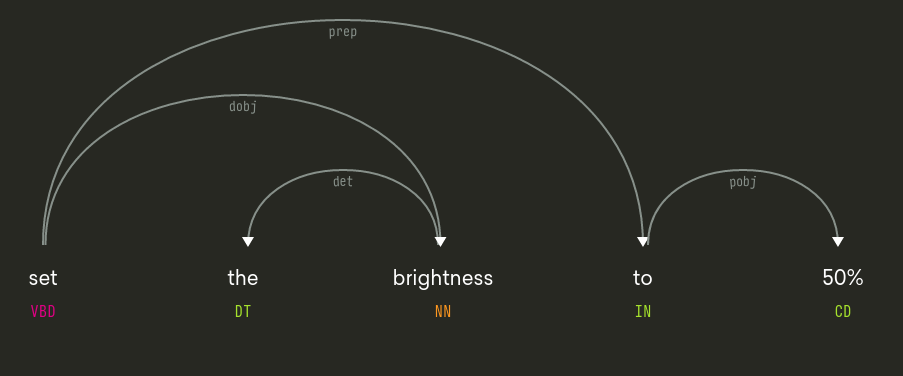
This graph is traversed to obtain the object, the property and the value. For each case, the list of edges (pobj - object of preposition, poss - possessive and so on) is given to the traversal function and it returns the target node. In this graph, “set” is the root vertex of the graph. The root vertex and the edge list ["dobj"] are passed to the function and it returns brightness. To get the value 50%, ["prep", "pobj"] is passed.
However, determining the sentence structure is slightly tricky. And keep in mind that this graph may not be right all the time. Spacy uses a linear sparse model to achieve an accuracy of 92% while Google’s state of the art SyntaxNet achieves an accuracy of 94%. Good enough for our purpose.
Well, how does it fare? This works almost flawlessly with gramatically correct sentences (with the right possessive nouns and so on). The feature extractor fails miserably as the sentences become a bunch of nouns with the rare “to” and “of”. For example, a command like set the volume of the VLC window playing House of Cards to 56% is easy to process. However, processing set volume vlc playing house of cards 30 turns out to be an absolute disaster for the rule based extractor. Where the line is drawn in terms of supporting horrible English is upto your vanity and curiosity.
Another issue with this approach is parsing nouns like “House of Cards” as three separate words. Consequently, this creates an ambiguity in distinguishing between <target_object_modifier> and <target_object>. Or worse, transforms the syntax graph into a whole new beast. A hacky fix for this is to make a list of things that must be parsed as proper nouns and force spacy to do that. There is a provision in spacy to do this. But to keep it open for possibly better hacks in the future, I did this manually.
for word in special_words:
	sentence = re.sub(r'[^"\w](' + unicode(word) + ')',r' "\1"', sentence, flags=re.IGNORECASE)

''' merge things within double quotes into a single proper noun token. '''
doc = nlp(sentence)
idx = -1
''' doc.merge() affects the for loop - so reversed '''
for word in reversed(doc):
    if word.text == '"':
        if idx == -1:
            idx = word.idx
        else:
            tok = doc.merge(word.idx,idx+1) //convert that into one token
            tok.tag_ = "NNP" //make it a proper noun
            idx = -1
The next step is to construct a knowledge graph with which we can provide context between sentences. And for that, we need an extractor capable of extracting complicated relations from these sentences. This needs more work and I’m bored of enumerating rules. As of now, I’m trying to distinguish between sentences that this feature extractor can deal with and those that it can’t. I’ll probably try generative models to answer questions about sentences and use that next.
>  start playing a song by "Arctic Monkeys"
play
{'action': u'start', 'target_media_by': [("Arctic Monkeys",pobj)], 'target_media': [(song,dobj)], 'target_application': []}

>  play something by lamb of god in vlc
play
{'action': 'start', 'target_media_by': [("lamb of god",pobj)], 'target_media': [(something,dobj)], 'target_application': [("vlc",pobj)]}

>  set the volume of vlc media player playing house of cards to 33%
modify
{'property': [(volume,dobj)], 'object_modifier': [(playing,acl), ("house of cards",dobj)], 'value': [(%,pobj), (33,nummod)], 'object': [("vlc media player",pobj)]}
For the sake of completion, I managed to write a few functions to interact with whatsapp on Ubuntu. However, they’re quite unstable and aren’t a part of this repository. If you have any suggestions, do ping me! Especially if you’re cringing at the ugly hacks in the code.
Finally, a shout out to the people who put up with my incredibly stupid questions about basic English and those who I brainstormed with! Hope you had fun.